
Chevron
Drill Site Representative Digital Toolkit
Client
Chevron
Role
Year
2022
Designer
Duration
4 months
Deliverables
Design research
Product design
Prototype


Drill
Site
Reps
Who is the user?
Drill Site Representative (DSR)
DSRs oversee the operations and safety of all personnel on rig site. The DSRs we focused on worked in the Mid Continent Business Unit which is in Texas & New Mexico. There is a Lead DSR and a Night DSR who carries over the night half of the 24 hour opperations.
Like any modern employee, they have many digital tools they use on a daily, weekly, and monthly basis.


How did we design for users we knew nothing about?
We became experts in oil drilling.
10+ interviews
Onsite research
Tools & Processes used by DSRs (It's a lot of tools)

"Too many tools, & it's too hard to find them."
Observed as being the major pain point across Drill Site Reps Interviewed

Phase
Design
01.
Site maps and wireframes.
This allowed us to improve the platform navigation.
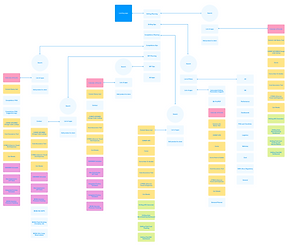

I mapped out the information architecture of the existing platform to organize the information in a more effective way. From there we used the Adobe wireframing kit to create visuals for the product owners to critique.
02.
Leverage the Pico Design System
Chevron’s internal UI design system for products and experiences, using Chevron’s brand guidelines.



One of the IBMers within the Chevron team worked to create an Adobe Xd library of type, icons, colors, components etc that are able to be dragged and dropped into files. These components were also made in code, so developers are able to seamlessly build out designs.
03.
Create a prototype to present to Product Owners & Users!
Chevron’s internal UI design system for products and experiences, using Chevron’s brand guidelines.

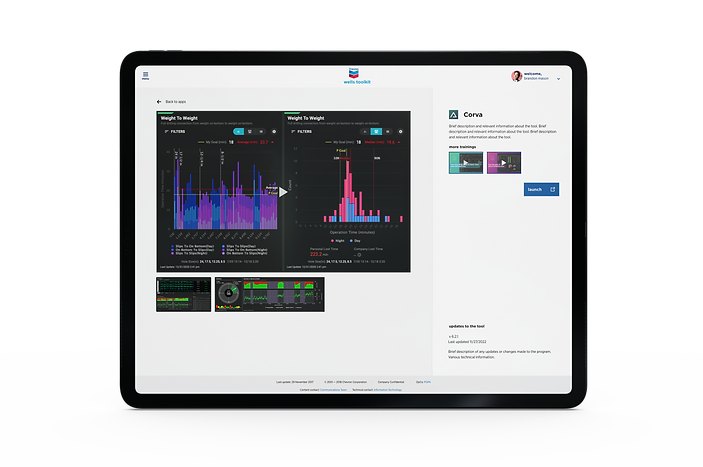
After many conversations with the product owners to fine tune hierarchy of information, navigation, and functionality of the platform, I created a final prototype to put in front of users.
"A Chevron


wide solution"
What did the product owners think?
Field Applications PO Team, Aleisha and Cameron saw the potential for this design to be a Chevron wide solution. The goal being to give users of all backgrounds the ability to organize their tools and maximize their digital efficiency.


Future State
Dark Mode
For improving usability in low-light and dark environments, mainly for users working late hours.
Mobile Version
Featuring mobile and offline-first applications and resources to make the platform more accessible.
Intelligent Tool Suggestions with AI
Ex: Most used apps on that particular time of day/week, Most frequently used apps and documents etc.